

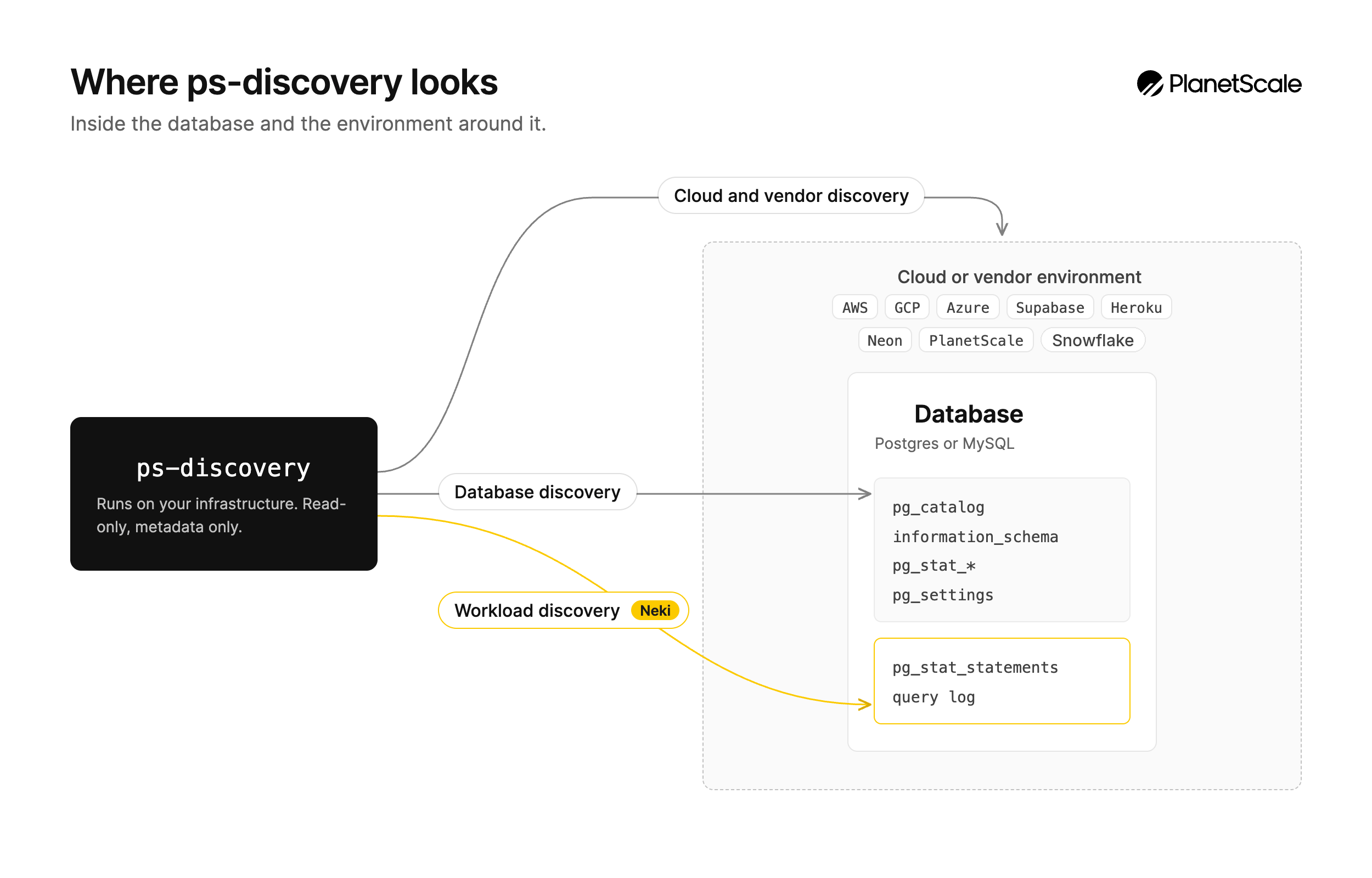
The discovery tool is open source and available on GitHub. Essential setup steps are below. Advanced usage, troubleshooting, and detailed reference are available in the full documentation.
What it discovers
Database analysis:- MySQL version, distribution, configuration, server variables, and cloud platform
- Schema structure, including databases, tables, columns, indexes, constraints, views, stored routines, triggers, and partitioning
- Performance statistics such as global status counter rates, process list summaries, InnoDB lock counters, and deadlock detection
- Replication configuration, including replica status, binary log inventory, binary log retention settings, and binary log format
- Security configuration, including SSL/TLS status, authentication plugin distribution, password policy settings, and aggregate privilege summaries
- Feature usage: full-text indexes, geospatial data types, foreign key constraints, table partitioning, InnoDB compression, XA transactions, prepared statements, Galera Cluster, and more
- Database instances, clusters, and their configurations
- RDS instances, Aurora clusters, Cloud SQL instances, and Azure Database for MySQL Flexible Servers
- VPC networking, subnets, security groups, firewall rules, and private connectivity
- Performance metrics from cloud monitoring services
- High availability and replica configurations
Installation
The discovery tool requires Python 3.10 or later.1
Download and extract
Download the latest release from GitHub and extract it:
2
Run setup
The setup script verifies your Python version, creates a virtual environment, installs dependencies, and writes a starter Select MySQL as the database engine during setup.
config.yaml:3
Configure credentials
Edit the generated configuration file to include your database and cloud provider credentials:At a minimum, configure your MySQL connection. See Configuration below for the full format.
Database user setup
Create a dedicated read-only user for the discovery tool. Connect to your MySQL-compatible database as a privileged user and run the following:On Amazon RDS, Aurora MySQL, Google Cloud SQL for MySQL, Azure Database for MySQL, MariaDB, and Percona Server, create the user through your administrative database user. Some managed services restrict access to certain system tables. The discovery tool reports those gaps and continues with the data it can collect.
PlanetScale and Vitess credentials
For PlanetScale databases, your existing branch credentials are sufficient. The discovery tool automatically detects PlanetScale and Vitess environments and adapts its queries. Add your branch credentials toconfig.yaml:
- The tool detects scoped
information_schemain Vitess and automatically falls back to per-database iteration - System databases such as
_vt,mysql, andperformance_schemaare excluded - Features not supported by Vitess are detected and reported
MySQL cleanup
Configuration
The discovery tool uses a YAML configuration file. Running./ps-discovery loads ./config.yaml by default. Configure the mysql block for database discovery and enable any cloud providers you want included:
database to a specific database name to focus analysis on one database:
Running discovery
Run discovery with the generatedconfig.yaml:
planetscale_discovery_results_20260708T072229.json. Share this report with PlanetScale for migration planning assistance.
Once MySQL discovery is complete, remember to clean up the
planetscale_discovery user you created on your source database.Cloud provider setup
Each cloud provider requires specific credentials and permissions. Below is a summary of what you need for each. For detailed instructions including IAM policies and API enablement steps, see the provider documentation.AWS (RDS / Aurora)
The tool discovers RDS instances, Aurora clusters, VPC networking, security groups, and CloudWatch metrics. Authentication (choose one):- AWS profile
- IAM instance profile when running on EC2
- Access key and secret key
- IAM role assumption for cross-account access
- RDS:
DescribeDBInstances,DescribeDBClusters,DescribeDBSubnetGroups,DescribeDBClusterParameterGroups,DescribeDBParameterGroups,DescribeOptionGroups - EC2:
DescribeVpcs,DescribeSubnets,DescribeSecurityGroups,DescribeRouteTables,DescribeInternetGateways,DescribeNatGateways,DescribeVpcEndpoints - CloudWatch:
GetMetricData,ListMetrics - STS:
GetCallerIdentity
Google Cloud (Cloud SQL)
The tool discovers Cloud SQL instances, VPC networks, firewall rules, and Cloud Monitoring metrics. Authentication (choose one):- Service account key file
- Application Default Credentials
- Environment variables
- Cloud SQL Admin API
- Compute Engine API
- Cloud Monitoring API
Azure (Database for MySQL)
The tool discovers Azure Database for MySQL Flexible Servers, virtual networks, network security groups, and firewall rules. Authentication (choose one):- Service principal with the Reader role (recommended)
- Azure CLI (
az login) or a managed identity AZURE_CLIENT_ID,AZURE_CLIENT_SECRET,AZURE_TENANT_ID, andAZURE_SUBSCRIPTION_IDenvironment variables
- Built-in Reader role at subscription or resource-group scope
- Resource providers registered on the subscription:
Microsoft.DBforMySQLandMicrosoft.Network
az login and omit the credentials block, or focus discovery on specific servers: